Galaxy Note 2 Revo ROM for lava iris 405

 Galaxy Note 2 Revo ROM for lava iris 405

Download the Galaxy Note 2 Revo ROM Completely


Download Link :   http://bit.ly/19F8RMN
 
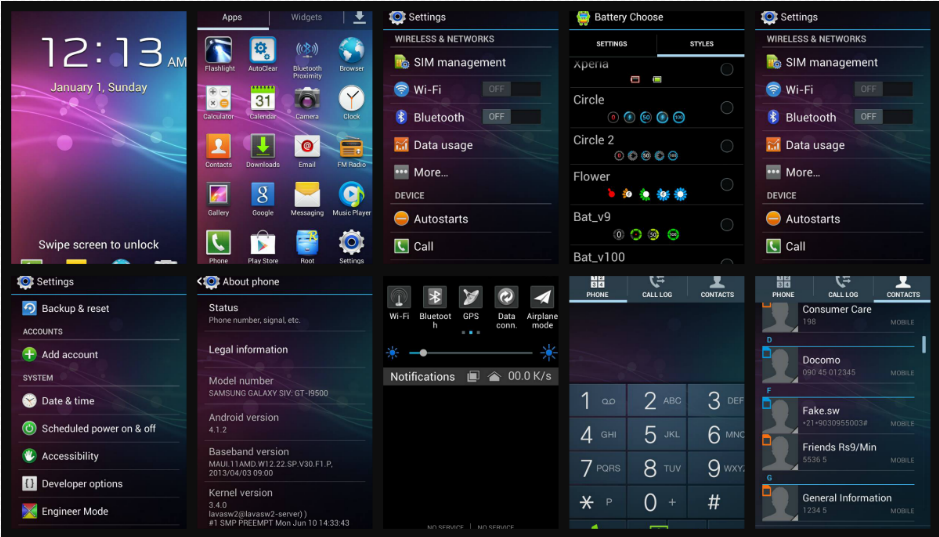
Screenshots


Take Full Nandroid Backup ( Always Recommended )

Credits : Vipul Verma

This Tutorial is for CWM Users

Install CWM From Here : CWM Link

Go To Recovery Mode :
Switch off the Phone Press and hold "Volume Up + Power"  Butons
Select Recovery Mode by Volume Up and Proceed to Recovery by Volume Down

CWM:

1. - wipe data factory reset --> Yes--delete all user data
2. - wipe cache partition --> Yes--Wipe Cache
3. - advanced --> Wipe Dalvik Cache --> Yes--wipe dalvik cache
4. - mounts and storage --> Format /System /data /cache
5. - install zip from sd --> - choose zip from sdcard --> - Select Zip
6. - reboot System now
7. - wait f0r 5-10 min to bootup


Bugs:
1.Camera

If U Got Any More Bugs Comment Below

Download Link :   http://bit.ly/19F8RMN

Njoy! Galaxy Note 2 Revo Vth all new Black UI notifiction bar  ;)

Android 4.2.1 For Lava Iris 405

Download the 4.2.1 ROM Completely


Download Link :   http://bit.ly/17zxjue
 
Screenshots


Take Full Nandroid Backup ( Always Recommended )

All Credits Goes To : Vipul Verma

This Tutorial is for CWM Users

Install CWM From Here : CWM Link

Go To Recovery Mode :
Switch off the Phone Press and hold "Volume Up + Power"  Butons
Select Recovery Mode by Volume Up and Proceed to Recovery by Volume Down


CWM:

1. - wipe data factory reset --> Yes--delete all user data
2. - wipe cache partition --> Yes--Wipe Cache
3. - advanced --> Wipe Dalvik Cache --> Yes--wipe dalvik cache
4. - mounts and storage --> Format /System /data /cache
5. - install zip from sd --> - choose zip from sdcard --> - Android 4.2.1 for iris405.zip
6. - reboot System now
7. - wait f0r 5-10 min to bootup


Bugs:
1.Camera

If U Got Any More Bugs Comment Below


Download Link :   http://bit.ly/17zxjue

Njoy! 4.2.1 Xperience Vth all new Black UI ;)

SUVI The first Custom Rom For Lava Iris 405

The first Custom Rom For Lava Iris 405

Enjoy the new Look

Download the Suvi ROM Completely From The Below Link

Link        : http://bit.ly/15Lfn03


Screenshots :


Take Full Nandroid Backup ( Always Recommended )

Credits : Vipul Verma & Þʀą

This Tutorial is for CWM Users

Install CWM From Here : CWM Link

Go To Recovery Mode :
Switch off the Phone Press and hold "Volume Up + Power"  Butons
Select Recovery Mode by Volume Up and Proceed to Recovery by Volume Down

CWM:
1. - wipe data factory reset --> Yes--delete all user data
2. - wipe cache partition --> Yes--Wipe Cache
3. - advanced --> Wipe Dalvik Cache --> Yes--wipe dalvik cache
4. - install zip from sd --> - choose zip from sdcard --> - Suvi For Iris 405.zip
5. - reboot System now
6. - wait f0r 5-10 min to bootup

Error - Boot Loop (Strucked On Samsung boot logo)

1.Recovery Mode :
    Switch off the Phone Press and hold "Volume Up + Power"  Butons
    Select Recovery Mode by Volume Up and Proceed to Recovery by Volume Down
2. backup and restore --> -advanced restore -->(user backup) --> -restore boot
3. reboot System now
4. wait for 5-10 min to bootup

Features :
1.CUSTOM ROM
2.Samsung Lockscreen
3.OG Battery Mod (Select battery Themes)
4.Facebook Home Support (Its a Launcher download from play)
5.Unlock Screen By Facelock
6.Black Themed ( Saves Battery Atleast Better than Stock )
7.New Customizable UI and Builtin Tools Etc..

Bugs:
1.Camera [ Pink Shade in Lowlight ] Still Managable in Daylight
2.Tethering & portable hotspot Not Working
3.Calculator Force Closing

If U Got Any More Bugs Comment Below

Njoy! Suvi Xperience Vth all new Samsung S IV UI ;)

Android 4.2.2 Custom Rom For LAVA IRIS 405

 Now Convert Your lava iris 405 andoid v.4.1.2  t 4.2.2 which was ported By Vipul Verma


Download the 4.2.2 ROM For Lava Iris 405 From The Below Links

Link             : http://bit.ly/GAP5qr

Screenshots : http://on.fb.me/1aNDZsf

Take Full Nandroid Backup ( Always Recommended )All Credits Goes To : Vipul Verma & PRA

This Tutorial is for CWM Users

Install CWM From Here : http://on.fb.me/1eZXpPF

Go To Recovery Mode :
Switch off the Phone Press and hold "Volume Up + Power"  Butons
Select Recovery Mode by Volume Up and Proceed to Recovery by Volume Down

CWM:
1. - wipe data factory reset --> Yes--delete all user data
2. - wipe cache partition --> Yes--Wipe Cache
3. - advanced --> Wipe Dalvik Cache --> Yes--wipe dalvik cache
4. - mounts and storage --> Format /System /data /cache
5. - install zip from sd --> - choose zip from sdcard --> - Android 4.2.2 for iris405.zip
6. - reboot System now
7. - wait f0r 5-10 min to bootup


Features :
1.CUSTOM ROM
2.Facebook Home Support (Its a Launcher download from play)
3.Unlock Screen By Facelock
4.Black Themed ( Saves Battery Atleast Better than Stock )

Bugs:
1.Camera [ No True Colors ] Still Managable in Daylight

If U Got Any More Bugs Comment Below

Njoy! 4.2.2 Xperience Vth all new Black UI ;)

The Best HTC One X Rom FoR Lava Iris 405

Download The Best HTC One X Rom For Lava Iris 405

Link             : http://bit.ly/157dai1
Screenshots : http://on.fb.me/156Q636

Take Full Nandroid Backup ( Always Recommended )

Credits : Vipul Verma & Þʀą

This Tutorial is for CWM Users

Install CWM From Here : http://on.fb.me/1eZXpPF

Go To Recovery Mode :
Switch off the Phone Press and hold "Volume Up + Power" Butons
Select Recovery Mode by Volume Up and Proceed to Recovery by Volume Down

CWM Users:
1. - wipe data factory reset --> Yes--delete all user data
2. - wipe cache partition --> Yes--Wipe Cache
3. - advanced --> Wipe Dalvik Cache --> Yes--wipe dalvik cache
4. - install zip from sd --> - choose zip from sdcard --> - Suvi For Iris 405.zip
5. - reboot System now
6. - wait f0r 5-10 min to boot up


Features:
1.CUSTOM ROM
2.HTC One X Lockscreen
3.Transparent Display
4.Facebook Home Support (Its a Launcher download from play)
5.Unlock Screen By Facelock
6.Special Features In Settings

Bugs:
1.Camera [ Low Quality ] Still Managable in Daylight


Njoy! HTC One X Xperience Vth the New HTC Transparent UI

The Most Beautiful LEWA Rom For Lava Iris 405

Download The Most Beautiful LEWA Rom For Lava Iris 405

Links : Docs : http://bit.ly/GBt1fL (recommended)
dropbox : http://bit.ly/178c836
Dev Host : http://bit.ly/1f7w2Dj

Screenshots : 


Take Full Nandroid Backup ( Always Recommended )

Credits : Vipul Verma & Rohan Taneja & Þʀą

This Tutorial is for CWM Users

Install CWM From Here : CWM Link

Go To Recovery Mode :
Switch off the Phone Press and hold "Volume Up + Power"  Butons
Select Recovery Mode by Volume Up and Proceed to Recovery by Volume Down

CWM:
1. - wipe data factory reset --> Yes--delete all user data
2. - wipe cache partition --> Yes--Wipe Cache
3. - advanced --> Wipe Dalvik Cache --> Yes--wipe dalvik cache
4. - install zip from sd --> - choose zip from sdcard --> - Lewa For Lava 405.zip
5. - reboot System now
6. - wait f0r 5-10 min to bootup


Features:

I Think You Know :P

Bugs:
1.Camera


If U Got Any More Bugs Comment Below

Njoy!

Legoice ROM Custom Rom For Lava Iris 405

Download the Legoice ROM

Google           : http://bit.ly/19dE3Ay
Dev Host       : http://bit.ly/1bVQGm7
Drop Box       : http://bit.ly/15kLhmL


Screenshots :


Take Full Nandroid Backup ( Always Recommended )

Credits : Vipul Verma & Þʀą

This Tutorial is for CWM Users

Install CWM From Here : CWM Link

Go To Recovery Mode :
Switch off the Phone Press and hold "Volume Up + Power"  Butons
Select Recovery Mode by Volume Up and Proceed to Recovery by Volume Down

CWM:
1. - wipe data factory reset --> Yes--delete all user data
2. - wipe cache partition --> Yes--Wipe Cache
3. - advanced --> Wipe Dalvik Cache --> Yes--wipe dalvik cache
4. - install zip from sd --> - choose zip from sdcard --> - Legoice S4 For Iris 405.zip
5. - reboot System now
6. - wait f0r 5-10 min to bootup


Features:
1.CUSTOM ROM
2.Samsung Lockscreen
3.OG Battery Mod (Select battery Themes)
4.Facebook Home Support (Its a Launcher download from play)
5.Unlock Screen By Facelock
6.Black Themed ( Saves Battery Atleast Better than Stock )
7.Better Sound Vth Walkman Music Player
8.
New Customizable UI and Builtin Tools Etc..

Bugs:
1.Camera [ Pink Shade in Lowlight ] Still Managable in Daylight


If U Got Any More Bugs Comment Below

Njoy!  Legoice Xperience Vth all new Samsung S IV : GT-19500 UI ;)

Xperia Blue Custom RoM For Lava Iris 405

Download the xperia Blue

Link        : http://bit.ly/1cvkUz2

Screenshots : http://on.fb.me/GN0N2o

Take Full Nandroid Backup ( Always Recommended )

Credits : Þʀą

This Tutorial is for CWM Users

Install CWM From Here : http://on.fb.me/1eZXpPF

Go To Recovery Mode :
Switch off the Phone Press and hold "Volume Up + Power"  Butons
Select Recovery Mode by Volume Up and Proceed to Recovery by Volume Down

CWM:
1. - wipe data factory reset --> Yes--delete all user data
2. - wipe cache partition --> Yes--Wipe Cache
3. - advanced --> Wipe Dalvik Cache --> Yes--wipe dalvik cache
4. - install zip from sd --> - choose zip from sdcard --> - Suvi For Iris 405.zip
5. - reboot System now
6. - wait f0r 5-10 min to bootup


Bugs:
1.Camera

TWRP Recovery for lava IRIS 405


Have You Rooted ur Device ? Now with CWM. . Tired of Using Buttons ? Here it is Touch Recovery TWRP. Enjoy.....!

Screenshots:
https://www.facebook.com/media/set/?set=oa.583598498370635&type=1

Steps:

1. Download "
Lava iris 405 TWRP Recovery....5.0.0.img" from
https://www.dropbox.com/s/2a9e8mvrtc3db7j/Lava%20iris%20405%20TWRP%20Recovery%202.5.0.0.img

Thanks to Anoop Kumar 1ce Again 
                 
2. Copy the"TWRP Recovery....5.0.0.img" file to the root of the SD card

3. Rename "
TWRP Recovery....5.0.0.img" to "recovery.img"
4. Install mobileuncle MTK tool from Google play.

https://play.google.com/store/apps/d...euncle.toolbox

5. Open it and click on recovery update.
Grant Superuser permissions When it asks

6. Select the recovery.img from the list confirm the installation and confirm reboot to recovery... :) Thats it . .Got TWRP Recovery for Iris 405  :)

Memory Swapping Trick on lava iris 405

[ Swap/Change SD Card as Internal and Internal as External ]
Do at ur Own Risk
First make a Nandroid Backup Before attempting this!!

Not enough Internal Memory ? Worried. Here is a Trick by adhi007 from XDA
Download this

file:
http://forum.xda-developers.com/attachment.php?attachmentid=2068112&d=1372156234
Go to file explorer (or) EX explorer (or) Root Explorer[ preferrable ]

open system/etc

then just click 'mt R+W' tab in the top right side corner of 'file explorer', which gives you the permissions to modify the file

Copy the original "vold.fstab" File from system/etc  and paste it somewhere else in ur SD card for safety as a backup file

Now copy the downloaded vold.fstab file and paste it by replacing 'vold.fstab' at system/etc

after replacement restart ur mobile . . Thats it.

Go to File Manager and See the Magic  :) :)

 
Related Posts Plugin for WordPress, Blogger...